How to Convert Audio to Text Online: A Complete Guide for 2026
Learn how to transcribe audio to text online with AI. Compare browser-based transcription vs desktop tools, discover 98-language support, speaker diarization, and how to get started with free credits — no install required.
EZAudio Team
Last Modified: August 1, 2026
What Is Audio to Text Conversion?
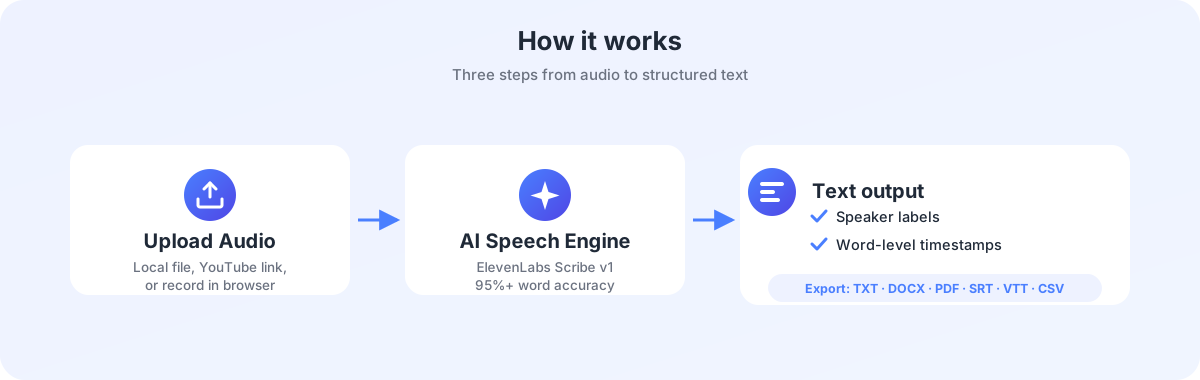
Audio to text conversion — also called speech-to-text (STT) or transcription — is the process of turning spoken language from an audio or video file into written text. Modern AI-powered speech recognition engines can handle this task in under a minute for a one-hour recording, with accuracy rates exceeding 95% for clear audio.
In 2026, online audio to text converters have replaced traditional manual transcription for most routine use cases. Whether you're a podcaster preparing show notes, a journalist searching interview recordings for quotes, a student capturing lecture content, or a professional documenting meeting minutes — browser-based AI transcription delivers results faster, cheaper, and with less friction than manual typing or desktop software.
Why Use a Browser-Based Audio to Text Converter?
Traditional transcription workflows involved either hand-typing hours of audio or installing multi-gigabyte desktop suites. Browser-based tools like EZAudio eliminate both paths:
| Browser-Based (EZAudio) | Desktop Apps / Manual Typing | |
|---|---|---|
| Installation | Zero — open a tab and upload | Download 500MB+ installer, configure dependencies |
| Processing speed | ~30 seconds per hour of audio | Manual: 4–6 hours per hour of audio; Desktop AI: depends on local CPU/GPU |
| Language coverage | 98 languages with auto-detection | Varies — many tools cap at 30 languages |
| Speaker diarization | Built-in, free | Often a premium add-on ($10+/month extra) |
| Cost | Free daily credits; plans from $9/month | $10–$30/month subscriptions or $1.25+/min for human transcription |
| Platform | Any device with a browser | OS-specific — separate licenses for Mac/Windows |
| Privacy | Auto-delete within 24h; no AI training | Audio often retained for model improvement |
EZAudio Audio to Text Converter: Features at a Glance
The EZAudio Audio to Text Converter is built on ElevenLabs Scribe v1, one of the most accurate speech recognition models available in 2026. Here's what sets it apart:
- 98-language transcription — English, Chinese, Japanese, Korean, Spanish, French, German, Arabic, Hindi, and 89 more, with accent-specific optimizations for major language variants
- Speaker diarization — Automatically detects and labels different speakers (Speaker A, Speaker B, etc.) so meeting transcripts, interview notes, and panel discussions are ready to read without manual speaker tagging
- Word-level timestamps — Every transcribed word includes a precise timestamp, making it easy to jump to specific moments in the source audio
- AI summary generation — After transcription, optionally generate a structured summary with key decisions, action items, and topic breakdowns using EZAudio credits
- Multiple input methods — Upload local files (30+ formats), paste YouTube / Google Drive / Dropbox links, or record directly in the browser
- Flexible export — Download transcripts as TXT, DOCX, PDF, SRT (subtitles), VTT (web captions), or CSV
Supported Languages and Formats
| Category | Details |
|---|---|
| Languages | 98 languages including English, Chinese (Simplified & Traditional), Japanese, Korean, Spanish, French, German, Portuguese, Arabic, Russian, Hindi, Italian, Dutch, Polish, Turkish, Vietnamese, Thai, Indonesian, Malay, Swedish, Norwegian, Danish, Finnish, Czech, Romanian, Greek, Hebrew, Ukrainian, and more |
| Audio formats | MP3, WAV, M4A, AAC, FLAC, OGG, WMA, AIFF, AMR, CAF, AC3, and 20+ more |
| Video formats | MP4, MOV, AVI, MKV, WebM, FLV, WMV, 3GP, and more — audio track is automatically extracted |
| URL input | YouTube links, Google Drive share links, Dropbox links, direct media URLs |
| Max duration | Guest users: up to 2 minutes; Registered users: up to 60 minutes (extendable) |
| Max file size | Guest: 25 MB; Registered: 100 MB |
How to Transcribe Audio to Text — Step by Step
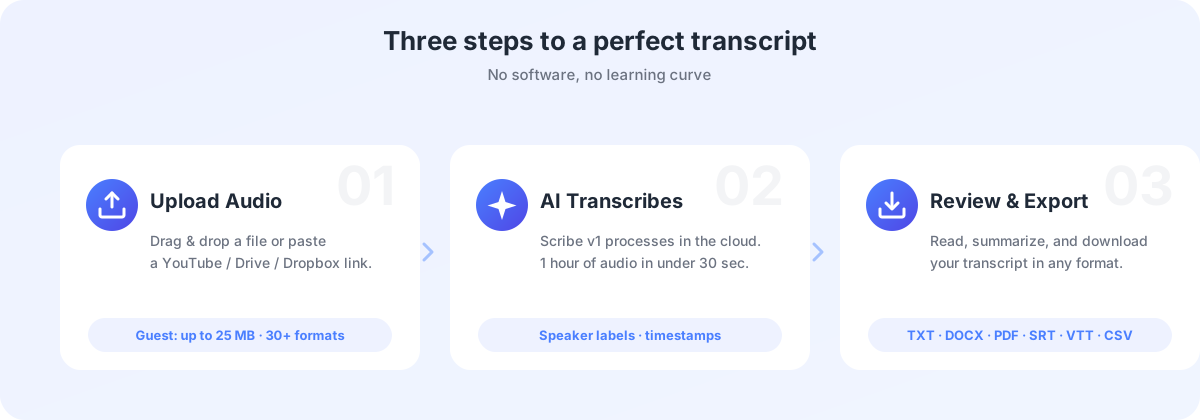
Using the EZAudio Audio to Text Converter takes three steps:
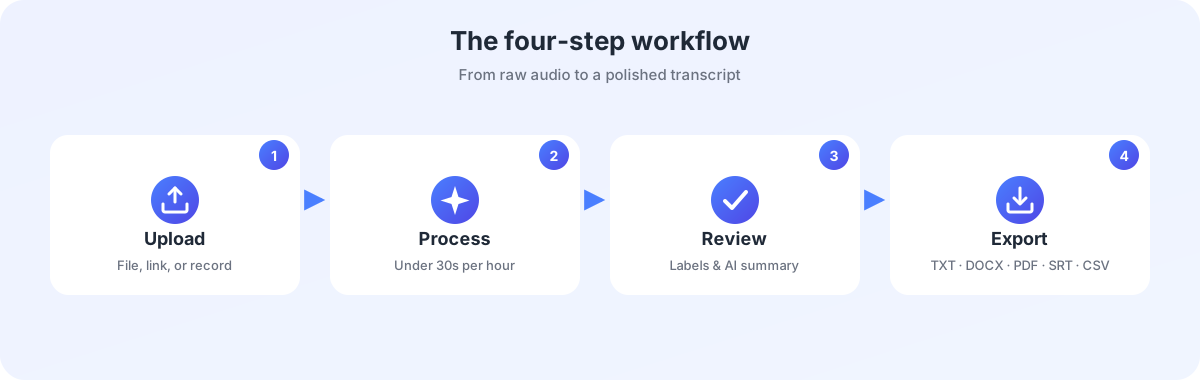
- Upload your audio or video — Drag and drop a file, paste a YouTube link, or use the built-in browser recorder. The converter accepts over 30 audio and video formats including MP3, WAV, M4A, MP4, MOV, and AVI. Guest users can upload up to 25 MB; registered users get up to 100 MB.
- AI transcribes automatically — The ElevenLabs Scribe v1 engine processes your file in the cloud. A one-hour recording typically finishes in under 30 seconds. Speaker labels are applied automatically, and word-level timestamps are generated alongside the text.
- Review, summarize, and export — Read the transcript in the browser, optionally generate an AI summary to extract key points and action items, then download in your preferred format (TXT, DOCX, PDF, SRT, VTT, or CSV).
Who Uses Audio to Text Converters?
| User | Workflow | Why EZAudio |
|---|---|---|
| Podcasters & content creators | Generate show notes, searchable transcripts, and social media captions from episode recordings | Speaker diarization handles multi-guest episodes; SRT/VTT export for YouTube captions |
| Journalists & researchers | Transcribe interviews, search for quotes, and produce article drafts from recorded conversations | 98-language support for international reporting; word-level timestamps for source verification |
| Students & academics | Convert lecture recordings into study notes; transcribe research interviews for qualitative analysis | Free daily credits without a credit card; AI summaries condense hours of material |
| Business professionals | Document meeting minutes, produce action-item lists, and create searchable archives of calls | Automatic speaker labels keep multi-person meetings readable; PDF export for sharing |
| Video editors & subtitlers | Generate SRT/VTT subtitle files from raw video content | Direct YouTube link input; word-level timestamps for precise subtitle sync |
Audio to Text Credits and Pricing
EZAudio uses a consumption-based credit system. Each transcription task uses a small number of credits based on audio duration and the features selected (e.g., AI summary generation). Here's how the credit system works for audio to text conversion:
- Base transcription — 2 credits per task + 1 credit per minute of audio (rounded up). A 3-minute file costs ~5 credits; a 10-minute file costs ~12 credits.
- AI summary — 3 credits base + 1 credit per 1,000 input tokens. A typical hour-long transcript summary costs ~8–12 credits.
Credit sources available to all users:
| Source | Amount | How to claim |
|---|---|---|
| Anonymous daily credits | 10 credits/day | Automatic — no registration needed |
| Registration bonus | 50 credits (one-time) | Sign up with Google or email |
| Daily login credits | 20 credits/day | Automatically credited on first login |
| Referral rewards | 50 credits per referral | Share your referral code |
| Subscription plans | 1,000–20,000 credits/month | Starter $9/mo, Pro $29/mo, Business $99/mo |
Visit the Credits page to check your balance or the Pricing page to compare plans.
Privacy and Security: How EZAudio Protects Your Data
Transcription involves uploading potentially sensitive audio — meeting recordings, interview notes, personal voice memos. EZAudio's privacy architecture was designed with this in mind:
| Measure | How it works |
|---|---|
| 256-bit SSL encryption | All data transmitted between your browser and EZAudio servers is encrypted with industry-standard TLS |
| 24-hour auto-deletion | Uploaded files and generated transcripts are automatically purged from servers within 24 hours of processing |
| No AI training | EZAudio never uses uploaded audio or transcribed text to train or improve AI models. Your content remains your content |
| In-memory processing | Files are processed in memory where possible; persistent storage is strictly limited to the processing window |
| No third-party sharing | Audio files and transcripts are never shared with advertisers, analytics providers, or other external parties |
By comparison, several popular transcription services — including Otter.ai and Rev.com — retain user audio for AI model training unless users explicitly opt out through buried preference settings.
Audio to Text Converter vs Desktop Transcription Tools
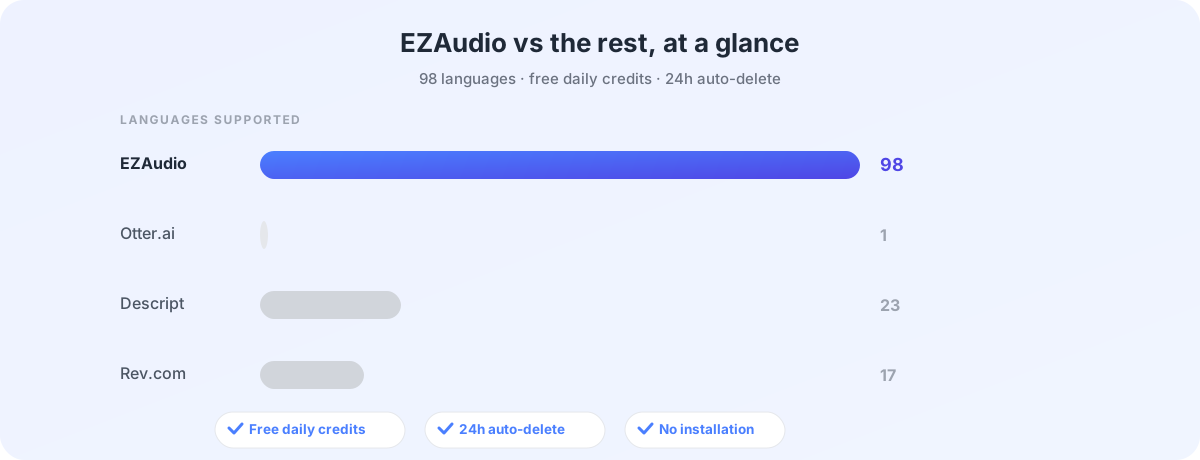
If you're evaluating transcription options in 2026, here's how the EZAudio Audio to Text Converter compares with major tools in the space:
| Feature | EZAudio | Otter.ai | Descript | Rev.com |
|---|---|---|---|---|
| Free tier | 10 credits/day (no credit card) | 300 min/month (requires account) | 1 hr/month (watermarked) | None (paid only) |
| Languages | 98 | English only | 23 | 17 |
| Speaker labels | Included (free) | Included | Included | +$0.25/min for human |
| AI summary | Included (credit-based) | Pro plan only | Pro plan only | Not available |
| Video file input | Yes (30+ formats) | No (audio only) | Yes (import) | No (audio only) |
| Upload from URL | YouTube, Drive, Dropbox | Zoom/Meet only | No | No |
| Install required | No (browser) | App or browser | Desktop app | App or browser |
| Privacy: auto-delete | 24 hours | Account-based retention | Local + cloud | 30 days |
Frequently Asked Questions
Can I transcribe audio for free?
Yes. Anonymous users get 10 free credits daily on EZAudio — enough for a short transcription task — with no credit card or registration required. Registered users get 20 credits daily plus a one-time 50-credit bonus. Visit the Credits page for details.
How accurate is AI audio to text conversion?
EZAudio uses ElevenLabs Scribe v1, which achieves over 95% word accuracy on clear, single-speaker audio. Accuracy varies with background noise, overlapping speech, and strong accents. The model is continuously updated with improvements from ElevenLabs' research pipeline.
What's the difference between Audio to Text Converter and Vocal Remover?
The Audio to Text Converter transcribes spoken language into readable text — it's for speech, not music. The Vocal Remover separates singing voices from instrumental accompaniment in songs. They serve completely different workflows. If you need to split a track into stems (drums, bass, vocals, etc.), see the Splitter instead.
Can I transcribe a YouTube video?
Yes. Paste any public YouTube URL into the EZAudio Audio to Text Converter, and the system will extract the audio track and transcribe it. This is useful for creating captions, pulling quotes from interviews, or generating article drafts from video content.
How long does transcription take?
Most files process in under 30 seconds per hour of audio. A 3-minute voice memo may finish in 5–10 seconds; a 60-minute meeting recording typically completes in under a minute. Processing time depends on server load and file size.
What export formats are available?
Transcripts can be downloaded as TXT (plain text), DOCX (Word document), PDF, SRT (subtitle file for video editors), VTT (web video captions), or CSV (spreadsheet with word-level timestamps).